Вашите продукти:
 - до тук 0.00 лв. / 0.00 €
с ДДС продукти - 0 бр. |
GB H97-HD3 / 1150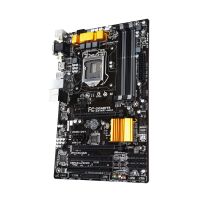
GB H97-HD3 / 1150(голяма снимка)
|
176.54 лв. / 90.26 € с ДДС
- до тук 0.00 лв. / 0.00 €
(общо продукти - 0 бр.)
|
към страницата на GB H97-HD3 / 1150
Описание на GB H97-HD3 / 1150:- GIGABYTE GA-H97-HD3
-
- • CPU
-
- Support for Intel® Core™ i7 processors/Intel® Core™ i5 processors/ Intel® Core™ i3 processors/Intel® Pentium® processors/ Intel®Celeron® processors in the LGA1150 packageL3 cache varies with CPU
-
- • ChipsetIntel® H97 Express Chipset
-
- • Memory
-
- 4 x DDR3 DIMM sockets supporting up to 32 GB of system memory
-
- Due to a Windows 32-bit operating system limitation, when more than 4 GB of physical memory is installed, the actual memory size displayed will be less than the size of the physical memory installed.Dual channel memory architectureSupport for DDR3 1600/1333 MHz memory modulesSupport for non-ECC memory modulesSupport for Extreme Memory Profile (XMP) memory modules
-
- • VGA
-
- 1 x D-Sub port, supporting a maximum resolution of 1920x1200@60Hz1 x DVI-D port, supporting a maximum resolution of 1920x1200@60Hz
-
- The DVI-D port does not support D-Sub connection by adapter.1 x HDMI port, supporting a maximum resolution of 4096x2160@24Hz or 2560x1600@60Hz
-
- Support for HDMI 1.4a version.Support for up to three displays at the same timeMaximum shared memory of 512MB
-
- • Multi-Graphics TechnologySupport for 2-Way AMD CrossFire™ technology
-
- • Expansion Slots
-
- 1 x PCI Express x16 slot, running at x16 (PCIEX16)(The PCIEX16 slot conforms to PCI Express 3.0 standard.)
-
- For optimum performance, if only one PCI Express graphics card is to be installed, be sure to install it in the PCIEX16 slot.1 x PCI Express x16 slot, running at x4 (PCIEX4)
-
- The PCIEX4 slot shares bandwidth with the PCI Express x1 slots. The PCI Express x1 slots will become unavailable when a PCIe x4 expansion card is installed.
-
- When installing a x8 or above card in the PCIEX4 slot, make sure to set PCIE Slot Configuration (PCH) in BIOS Setup to x4.2 x PCI Express x1 slots(The PCIEX4 and PCI Express x1 slots conform to PCI Express 2.0 standard.)2 x PCI slots
-
- • Connectors
-
- 1 x 24-pin ATX main power connector1 x 8-pin ATX 12V power connector6 x SATA 6Gb/s connectors1 x CPU fan header3 x system fan headers1 x front panel header1 x front panel audio header1 x S/PDIF Out header1 x USB 3.0/2.0 header3 x USB 2.0/1.1 headers1 x serial port header1 x parallel port header1 x Clear CMOS jumper
-
- • Storage Interface
-
- 6 x SATA 6Gb/s connectorsSupport for RAID 0, RAID 1, RAID 5, and RAID 10
-
- • Audio
-
- Realtek® ALC887 codecHigh Definition Audio2/4/5.1/7.1-channel
-
- • LANRealtek® GbE LAN chip (10/100/1000 Mbit)
-
- • Rear Panel I/O Ports
-
- 1 x PS/2 keyboard/mouse port1 x D-Sub port1 x DVI-D port1 x HDMI port4 x USB 3.0/2.0 ports2 x USB 2.0/1.1 ports1 x RJ-45 port6 x audio jacks (Center/Subwoofer Speaker Out, Rear Speaker Out, Side Speaker Out, Line In, Line Out, Mic In)
-
- • BIOS
-
- 2 x 64 Mbit flashUse of licensed AMI UEFI BIOSSupport for DualBIOS™PnP 1.0a, DMI 2.7, WfM 2.0, SM BIOS 2.7, ACPI 5.0
-
- • Form Factor
-
- ATX Form Factor; 30.5cm x 19.0cm
-
- • PackageBox
-

Последно добавени продукти в категорията:
|